
Answers from your clinic data
Ask about patients, appointments and invoices without searching across pages.
For doctors, clinic owners and their teams
Organize appointments, patient records and billing in one system, with tools for your specialty and an AI assistant to search clinic data and prepare for visits.
Your 14-day free trial starts after request review, approval and activation.
AI that helps your team with everyday work
Ask about clinic data, review pre-visit summaries, and prepare tasks and follow-up for your team's review.
Ask about patients, appointments and invoices without searching across pages.
Review available information and important alerts, then return to the complete record when needed.
Review the suggested details and actions before confirming them.

Actual Arabic application screens · Synthetic data, not customer records
The animation could not play. The static scene remains available.
AI features depend on your plan and configuration. Your team reviews suggestions and remains responsible for clinical decisions.
Tools for every specialty
Share appointments, patient records and billing, with clinical tools suited to each specialty.
Dental charts, treatment plans, periodontal exams and orthodontic follow-up, alongside appointments and billing.
Explore dental toolsDocument conditions, clinical photos and procedures, and review progress across visits.
Explore dermatology toolsDocument visits, vital signs, diagnoses and tests, with care and follow-up plans.
Explore general medicine toolsInitial assessments, rehabilitation goals and session records to track pain, movement and patient response.
Explore physiotherapy toolsAvailable tools vary by clinic type, department, plan, permissions and configuration.
Connected clinic tools
From appointments and patient records to communication, billing and clinic operations.
Features depend on your plan, clinic specialty, permissions and configuration.
Explore all Eyadat featuresSynthetic data only. Explore screens, search and try sample actions; nothing is saved to a clinic or sent. Available tools vary by specialty, plan, permissions and setup.
A sample of daily clinical and administrative work.
| Time | Patient | Doctor | Resource | Status |
|---|---|---|---|---|
| 09:00 | Sara Demo | Dr Demo A | Exam room A | Confirmed |
| 10:00 | Omar Demo | Dr Demo B | Exam room B | Awaiting confirmation |
| 11:00 | Layla Demo | Dr Demo A | Exam room A | Arrived |
Select a section from the system menu to start exploring.
Patient care and billing
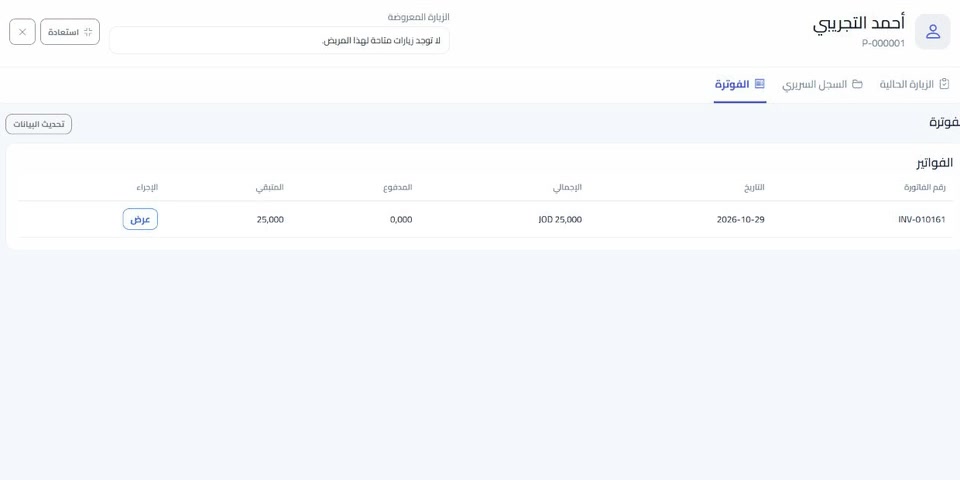
Bring patient information, clinical records and permitted financial information together, so your team can review each visit in context.
Appointments and communication
Choose the doctor, time and clinical resource, then follow the patient's visit and configured reminders from the existing workflow.
Messaging requires an enabled connection, approved templates where required, and the patient's communication preferences.
Explore appointment management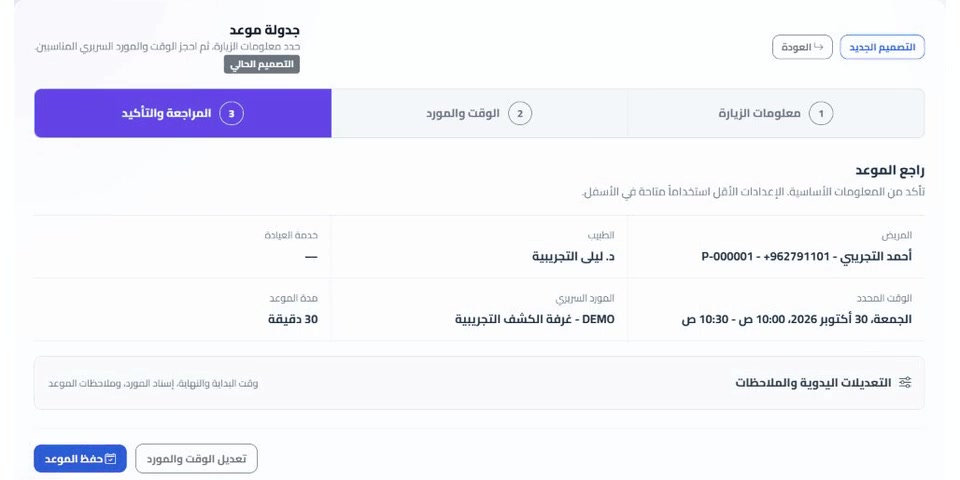
Recently expanded workflows
Recent Eyadat updates connect chairs, rooms, and other clinical resources with appointments, patient safety, consent, delivered care, laboratories, materials, and finance to reduce repeated entry across the clinic.
Add DICOM studies to the patient file and view them through OHIF alongside ordinary documents and images.
Requires configured storage and access permissions. OHIF is not certified for diagnosis or surgical planning; measurements are session-only.
Explore DICOM supportBook the right time and clinical resource together, then follow availability, assignment, use, preparation, cleaning, and operational blocks from one board.
Issue patient consents from the patient, appointment, treatment plan, or service context and preserve the accepted content and verification history.
Keep prominent, permission-aware precautions with the patient and surface them during appointment workflows for every clinic specialty.
Select performed services from the appointment or treatment plan and prepare billing when the visit or multi-appointment treatment reaches the right stage.
Carry priced outsourced laboratory tests into a patient draft invoice when the laboratory accepts the order.
Manage deposits, service packages, installments, split draft charges, and auditable corrections without rewriting issued invoices.
Why Eyadat
Built for the people running the clinic each day.
Country-aware billing
The clinic country controls its currency, tax workflow, official holidays, and national e-invoicing provider.
Generate ZATCA-oriented UBL 2.1 invoices with QR, cryptographic signing, reporting or clearance modes, status tracking, and deadline alerts.
Saudi clinic supportConfigure Jordanian invoice types, tax settings, simulation, official submission, QR, and response references.
Jordan clinic supportPrepare PINT-AE invoices and credit notes in AED, with simulation and status tracking. Live submission requires configuring and testing the service provider connection.
UAE clinic supportProvider-specific credentials and rules stay isolated while the clinic team uses one consistent invoice workflow.
View e-invoicing guideSecurity and privacy
Keep clinical and financial access under the clinic's control.
Each clinic operates within its own data sphere, to reduce the risk of mixing up patient records, appointments and billing.
User roles and transaction history help management control access and review important activity.
Patient files go through type, size and screening restrictions before being saved within the system.
A closer look
Watch the Eyadat introduction, then request a demonstration of the tools and specialty workflows you need.
Explore the interactive product previewGetting started
Choose a demonstration or request a trial, then prepare your clinic after activation.
Request a demonstration or send your trial request with your clinic and contact details.
We review the trial request and email the activation link after manual approval.
Your 14-day trial starts on activation. Prepare staff, hours and the services your clinic uses.
Before you choose
Open the support page for quick answers, the user guide, or to send a support request. Include the clinic name, page, and steps to reproduce the issue, and check your contact details.
SupportAgree with the team in advance on the setup and training assistance included in your subscription, its scope, timing, and any additional cost, especially for data migration or requested training.
SupportNo. Eyadat supports different clinic specialties. Clinical tools vary by clinic type, department, plan and permissions.
The trial lasts 14 days from account activation, after verification and manual approval. No payment card is required to request it.
The available Excel import tools include review and mapping steps. Confirm the required records, attachments and migration scope with the team before starting.
Supported workflows vary by country. Live submission requires the relevant tax information, provider setup and successful connection tests.
View e-invoicing guideThe web interface adapts to different screen sizes. The available tools depend on your role, permissions and clinic configuration.
Availability depends on the plan and configured services. Review messaging, AI, storage and any provider charges with the team before subscribing.
Your clinic, your workflow
Explore the tools with a demonstration, or request a free trial after reviewing the plans.
Your 14-day free trial starts after request review, approval and activation.
